
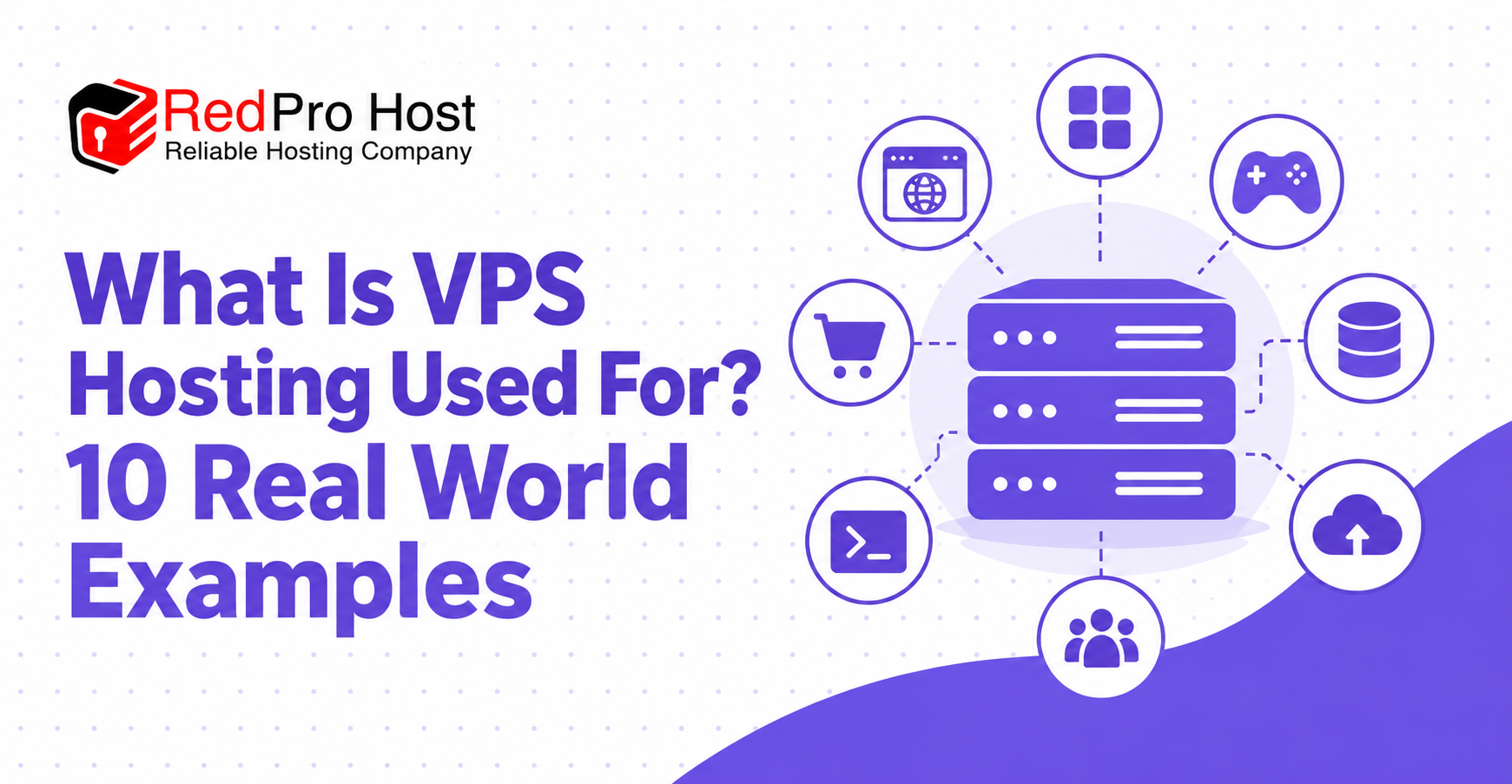
VPS hosting lets you run websites, applications, game servers, and other online services with greater control. A Virtual Private Server (VPS) operates inside a physical server using virtualization technology. It provides an isolated environment with allocated CPU, RAM, and storage.
Website owners, businesses, and developers use VPS hosting when basic shared hosting no longer meets their needs. It can support growing websites, custom software, and services that run around the clock. However, VPS hosting also brings additional costs and server management responsibilities.
This guide explains what is VPS hosting used for through 10 real-world examples. You’ll learn how VPS hosting works and why different users choose it. We’ll also cover its benefits, limitations, pricing, and when upgrading makes sense.
What Is VPS Hosting?
VPS hosting is a web hosting service that provides an independent virtual server within a shared physical machine. VPS stands for Virtual Private Server, and it operates using virtualization technology. This technology divides one physical server into separate environments, each functioning like an independent computer.
Unlike traditional shared hosting, a VPS typically provides a defined allocation of computing resources. These include CPU processing capacity, RAM for running applications, and storage for files and databases. For example, a VPS plan might include 2 vCPUs, 4 GB RAM, and 80 GB SSD storage.
The main purpose of VPS hosting is to provide greater control, flexibility, and resource isolation. Users can install compatible software, configure server settings, and manage their hosting environment. This makes VPS useful for WordPress websites, custom applications, and online services requiring specific configurations.
According to W3Techs, WordPress powers 39.7% of all websites as of October 16, 2026. WordPress websites can run on shared hosting or VPS hosting, depending on their requirements. A growing WooCommerce store may benefit from additional resources, while a small blog may not.
VPS hosting also offers administrative control, commonly called root access on Linux servers. Root access allows users to modify server configurations and install specialized software. However, greater control also means additional security and maintenance responsibilities, especially with unmanaged hosting.
How Does VPS Hosting Work?
VPS hosting works by dividing one physical server into independent virtual servers using virtualization technology. Each virtual server receives its own operating environment and allocated computing resources. This allows different customers to run applications without sharing the same operating system.
A physical server is a powerful computer housed inside a data center. Software called a hypervisor creates and manages virtual machines on that computer. For example, one physical server could support 4 VPS instances, depending on its hardware capacity.
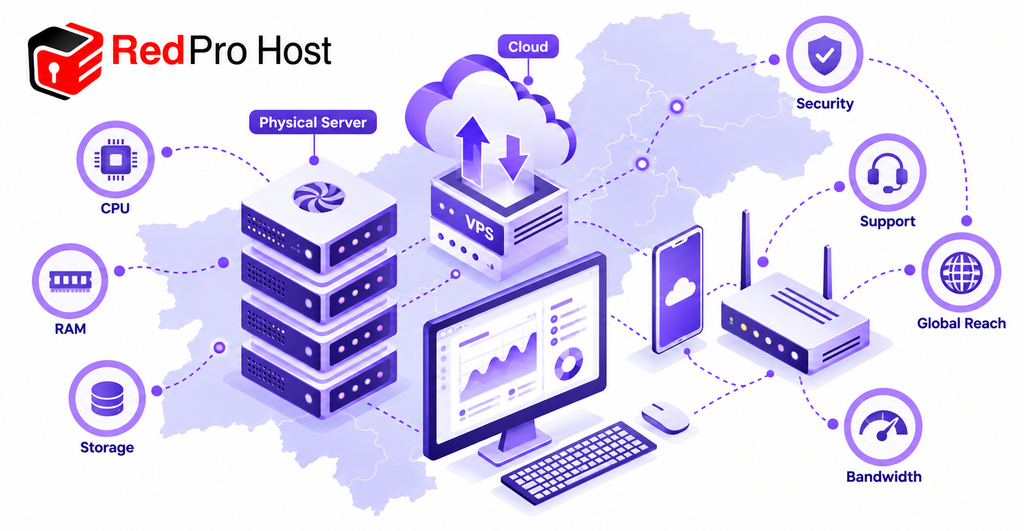
Each VPS receives computing resources according to its selected hosting plan. These allocations determine how much processing, memory, and storage capacity the virtual server can use. The main resources include:
- CPU or vCPU: Processes instructions and runs application code.
- RAM: Temporarily stores information needed by running software.
- Storage: Holds website files, application software, and databases.
- Bandwidth and data transfer: Determine network capacity and permitted usage.
For example, a VPS with 2 vCPUs, 4 GB RAM, and 80 GB SSD storage could host a modest website. Its actual capacity depends on traffic, caching, software, and database activity. These specifications do not guarantee a particular number of visitors.
Each VPS usually runs an operating system such as Ubuntu, Debian, or Windows Server. With root or administrator access, users can install software and modify server configurations. Managed VPS plans may restrict certain changes because the provider maintains parts of the environment.
Think of a physical server as an apartment building containing several private apartments. Each apartment has its own living space, although everyone shares the same building. Similarly, VPS customers control separate virtual environments while sharing underlying physical hardware.
What Is VPS Hosting Used For? 10 Common Uses
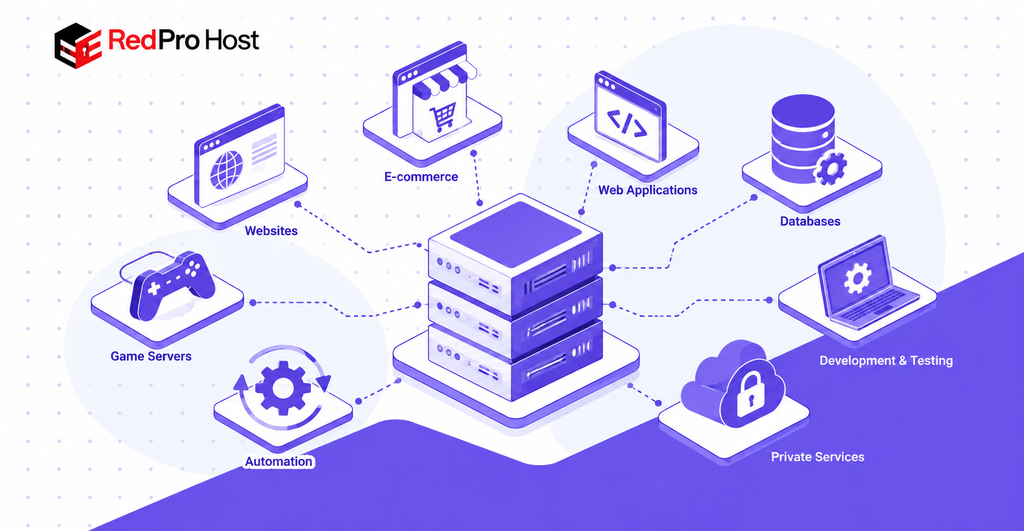
VPS hosting is used for website hosting, ecommerce, application development, gaming, automation, databases, and private online services. It gives users more control over software installation and server configuration than traditional shared hosting. The following 10 examples explain its practical applications and important limitations.
1. Hosting Websites and Blogs
VPS hosting allows you to host one or multiple websites on a single virtual server. It supports WordPress blogs, business websites, and online portfolios with different resource requirements. This is useful when basic shared hosting becomes restrictive.
For example, a web development agency could host 5 client websites on one appropriately configured VPS. Each website could have its own domain, database, and application files. The agency could also configure separate user permissions and website settings.
A VPS supports web server software such as Nginx and Apache. These programs deliver website content to visitors through their browsers. Administrators can also configure PHP, caching, and database services for WordPress.
However, a VPS does not automatically make every website faster. Performance depends on server resources, website optimization, and traffic patterns. A small personal blog may perform perfectly well on affordable shared hosting.
2. Running E-commerce Stores
VPS hosting supports online stores that require additional resources and control over server configuration. It can run ecommerce platforms such as WooCommerce, Magento, and PrestaShop. These platforms manage product catalogs, customer accounts, shopping carts, and checkout activity.
For example, a WooCommerce store might experience increased traffic during a seasonal sale. More visitors can create additional database queries and server processing demands. A properly sized VPS can provide resources for these workloads.
Store owners can configure caching, PHP settings, and database performance according to their requirements. They can also install security software and monitor resource consumption. These capabilities are useful for stores with custom plugins or demanding features.
However, VPS hosting does not automatically guarantee secure payment processing or uninterrupted checkout. Online stores still require HTTPS, security updates, reliable backups, and appropriate payment services. Proper website optimization remains important regardless of hosting type.
3. Hosting Web Applications and APIs
A VPS can run custom web applications and APIs requiring specific software configurations. Developers can install programming environments such as Python, Node.js, and PHP. They can also deploy frameworks such as Django, Express.js, and Laravel.
For example, a small business could host a customer management system on a VPS. Employees could sign in through a browser to update customer information and track service requests. The application could connect to a database hosted on the same server.
A VPS can also host an Application Programming Interface, commonly called an API. An API allows software applications to exchange information and perform requested actions. For example, a mobile booking application could communicate with a VPS-hosted API.
VPS hosting provides flexibility for installing software and configuring application environments. Developers can adjust server processes, networking rules, and deployment settings. However, application reliability still depends on code quality, available resources, and system maintenance.
4. Hosting Databases
VPS hosting allows users to run database software independently or alongside their websites and applications. Common examples include MySQL, PostgreSQL, and Redis. These technologies store or retrieve information used by online services.
For example, an appointment booking website could use PostgreSQL to store reservations and customer details. The database would process requests when visitors book or cancel appointments. A VPS provides an environment where the administrator can manage database configuration.
Small applications may run their website and database on one VPS. Larger workloads may require a separate database server to manage resource consumption. The correct setup depends on database size, concurrent activity, and performance requirements.
Database hosting also requires security measures such as restricted access and encrypted connections. Administrators must configure backups and test whether data can be restored successfully. A VPS provides administrative flexibility but does not replace database management.
5. Creating Development and Testing Environments
Developers use VPS hosting to build, test, and update software before releasing it publicly. A VPS can provide a staging environment that operates separately from the live website. This reduces the risk of testing changes directly on production systems.
For example, a developer could copy a WordPress website to a staging VPS. The developer could test plugin updates and design changes without affecting real visitors. Once testing succeeds, the approved changes could move to the live website.
VPS hosting also supports development software such as Git, Docker, and automated testing tools. Docker packages an application and its required software into a container. Containers help developers maintain consistent environments between testing and deployment.
Teams can also run automated deployment workflows using compatible server software. However, testing environments still consume CPU, RAM, and storage. A separate VPS is useful when development activity could interfere with production workloads.
6. Running Multiplayer Game Servers
VPS hosting can run multiplayer game servers for compatible games such as Minecraft and Terraria. A dedicated game server manages gameplay and allows participants to connect over the internet. It operates independently from an individual player’s personal computer.
For example, a group of 10 friends could rent a VPS for a private Minecraft world. The server could remain available even when the person who created the world disconnects. Administrators could manage player permissions, world settings, and installed modifications.
Gaming performance depends on processor speed, RAM, network latency, and player activity. A heavily modified Minecraft server may need substantially more memory than a basic server. The location of the VPS also affects network delay between players and the game server.
Not every multiplayer game supports hosting on a standard VPS. Some require Windows, specialized software, or dedicated hardware performance. Always check the game’s server requirements before selecting hosting.
7. Running Automation Tools and Scripts
A VPS can run automated tasks without requiring a personal computer to remain switched on. These tasks include scheduled backups, data processing, monitoring, and software notifications. Businesses and developers use this capability to support recurring workflows.
For example, a website administrator could schedule a backup script to run daily at 2:00 AM. Linux provides a scheduling tool called cron for running commands automatically. The script could create a backup and transfer it to separate storage.
A VPS can also host automation software such as n8n. This platform connects compatible services and performs predefined actions. For example, a workflow could record contact form submissions and notify the appropriate employee.
Developers can also run background workers and customer-managed AI agent software on a VPS. However, always-on hosting does not guarantee uninterrupted application operation. Monitoring, resource limits, software updates, and automatic restarts remain important.
8. Hosting Private Cloud Storage and Files
VPS hosting can provide private file storage and sharing through software such as Nextcloud. Nextcloud allows users to upload, organize, synchronize, and share documents. Administrators can also manage access to specific files and folders.
For example, a design agency could use Nextcloud to share project files among 5 employees. Team members could access approved documents from their computers or mobile devices. Access permissions would determine who can view or modify each folder.
A VPS can also serve as a remote backup destination for website files. This separates backup storage from the main production server. However, a backup stored on one VPS still needs protection against hardware failure and account compromise.
Private storage does not automatically mean secure storage. Administrators must configure encrypted connections, strong authentication, software updates, and additional backups. Storage capacity and data transfer costs should also be considered before deployment.
9. Hosting a Private VPN Server
A VPS can host VPN software that creates encrypted network connections for remote access. VPN stands for Virtual Private Network, while VPS stands for Virtual Private Server. These technologies serve different purposes but can work together.
For example, a company with 8 remote employees could host WireGuard on a VPS. Employees could connect through the VPN to reach an approved internal application. The encrypted connection helps protect traffic between their devices and the VPN server.
Other compatible VPN software includes OpenVPN. Administrators can configure user access, encryption settings, and firewall restrictions. This offers greater control over a private networking environment.
However, a self-hosted VPN does not provide complete anonymity or automatic security. The VPS provider can still observe relevant infrastructure activity, and destination services can identify users through other information. Proper configuration and access management remain essential.
10. Running Email and Communication Servers
VPS hosting allows organizations to operate email servers and certain communication services independently. Administrators can install email software such as Postfix and Dovecot. These programs handle outgoing messages, incoming mail, and mailbox access.
For example, a business could host email accounts such as support@example.com and sales@example.com. The server could manage company mailboxes and custom domain settings. This provides more configuration control than many basic hosting packages.
However, email hosting requires proper DNS configuration and sender authentication. Administrators should configure SPF, DKIM, and DMARC to help receiving servers evaluate outgoing mail. They must also manage spam protection, software updates, and IP reputation.
Some VPS providers restrict outgoing email connections, especially through port 25. A dedicated IP address does not guarantee successful email delivery. Businesses without email administration experience may prefer a managed email service.
What Are the Benefits of VPS Hosting?
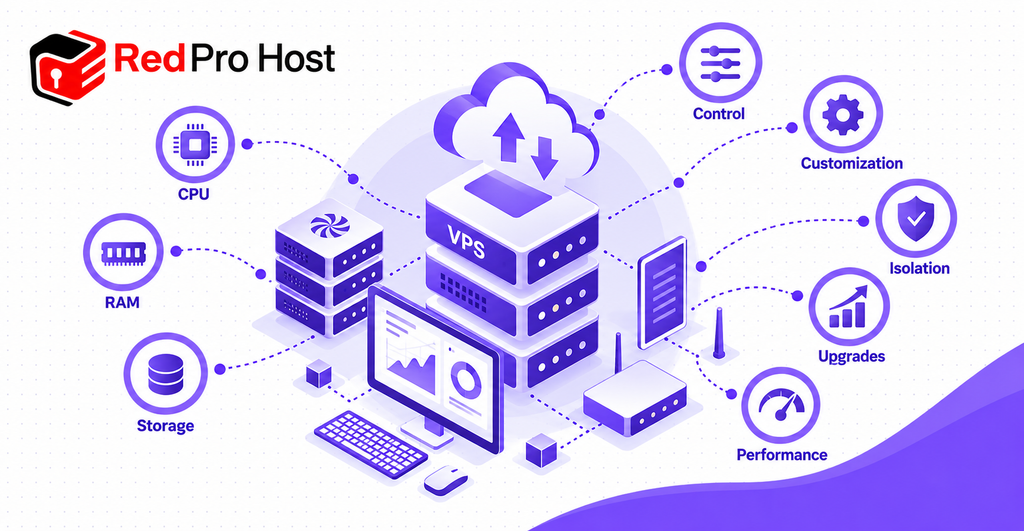
The main benefits of VPS hosting include greater server control, allocated computing resources, workload isolation, and flexible customization. These capabilities support websites and applications that need more freedom than basic shared hosting provides. However, the actual benefits depend on your hosting plan and server configuration.
1. More Control Over Server Settings
VPS hosting often includes root access for managing your virtual server. You can modify firewall settings, install compatible software, and configure web server behavior. For example, a developer could install Nginx and customize its application routing.
2. Allocated CPU, RAM, and Storage
A VPS provides defined computing resources according to its hosting package. For example, one plan may include 2 vCPUs, 4 GB RAM, and 80 GB SSD storage. This helps administrators plan resource usage for applications such as WordPress and PostgreSQL.
3. Greater Software Customization
You can configure an operating environment suited to your project. For example, you could install Docker, Node.js, and Redis for a custom web application. Shared hosting generally offers fewer server-level customization options.
4. Improved Workload Isolation
Each VPS operates inside a separate virtual environment. This reduces direct interference between neighboring hosting accounts. However, all instances still depend on shared physical infrastructure, so isolation is not absolute.
5. Flexible Resource Upgrades
Many VPS providers allow upgrades when resource demand increases. For example, you might move from 4 GB RAM to 8 GB RAM. Available upgrade options, downtime requirements, and billing changes depend on the provider.
6. More Predictable Performance
Allocated resources can improve performance consistency compared with restrictive shared hosting. However, actual speed depends on application design, server capacity, and configuration. VPS hosting does not eliminate network outages or software problems.
For perspective, Amazon Lightsail’s service agreement uses a 99.5% monthly uptime threshold for its individual-instance service credits. This is a provider-specific service agreement, not a universal VPS uptime guarantee. It also does not guarantee that a hosted website will always function correctly.
Who Should Use VPS Hosting?
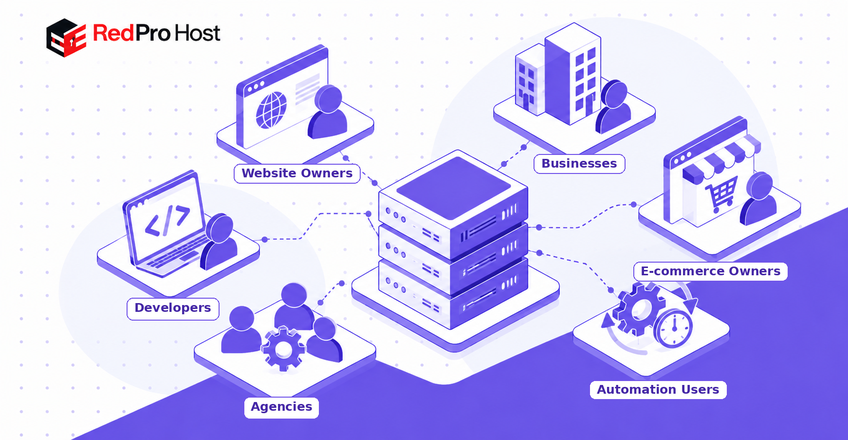
VPS hosting suits website owners, businesses, developers, and agencies requiring flexible resources or greater server control. It is particularly relevant when shared hosting restricts application performance or software configuration. Here are 6 common user groups that may benefit.
1. Growing Website Owners
A growing blog or business website may eventually exceed shared hosting resource limits. For example, a WordPress website with demanding plugins may require additional CPU and RAM. A VPS can provide a more configurable environment for managing that workload.
2. Small and Medium Sized Businesses
Businesses may need to host applications such as booking systems, CRM software, or internal dashboards. A VPS can support compatible applications with customized software requirements. However, organizations must also consider security, backups, and technical support.
3. E-commerce Store Owners
Online stores using WooCommerce or Magento can generate substantial database and processing activity. A VPS may help when shared hosting cannot accommodate the workload. The store still needs security monitoring, payment protection, and regular maintenance.
4. Web and Application Developers
Developers use VPS hosting for custom applications, testing, and deployment. For example, a Python developer could install Django and PostgreSQL on an unmanaged Linux VPS. This provides greater freedom than a hosting account with restricted software access.
5. Web Development Agencies
An agency managing 5 client websites might consolidate hosting on one suitable VPS. This can simplify certain administrative tasks and resource planning. However, hosting several clients together also creates shared failure and security risks.
6. Users Running Always-On Applications
VPS hosting supports scheduled scripts, monitoring software, and automation platforms such as n8n. These services can operate independently from a user’s home computer. Reliable operation still requires monitoring and recovery procedures.
Not everyone needs VPS hosting. A personal portfolio, simple blog, or small informational website may work well on shared hosting. Beginners who lack server administration experience may prefer managed VPS or managed WordPress hosting.
When Should You Upgrade to VPS Hosting?
You should upgrade to VPS hosting when shared hosting cannot reliably support your website’s resource or software requirements. An upgrade becomes relevant when measurable limitations affect performance or functionality. The following 5 signs can help you decide.
1. Your Hosting Reaches Resource Limits
Shared hosting providers may restrict CPU usage, memory, or running processes. Frequent resource-limit warnings can indicate that your workload exceeds the plan. Review hosting statistics before deciding whether an upgrade is necessary.
2. Your Website Slows During Traffic Spikes
Higher traffic can create additional CPU and database demands. Google recommends a Largest Contentful Paint of 2.5 seconds or less at the 75th percentile. However, poor page speed may also result from inefficient code or oversized images.
3. You Need Root Access
Shared hosting often restricts operating system and server configuration changes. A VPS can provide root access for compatible software installation. For example, you could configure a custom Node.js application.
4. You Need More Server Customization
Some applications require specific software versions or networking settings. VPS hosting allows greater control over compatible configurations. This becomes useful when basic hosting cannot support your deployment requirements.
5. Your Applications Need Additional Resources
Database activity, automation workloads, and ecommerce software may require more capacity. A VPS offers defined resource allocations that can support these applications. Before upgrading, measure CPU, RAM, and storage usage to identify the actual limitation.
VPS Hosting vs. Other Hosting Types
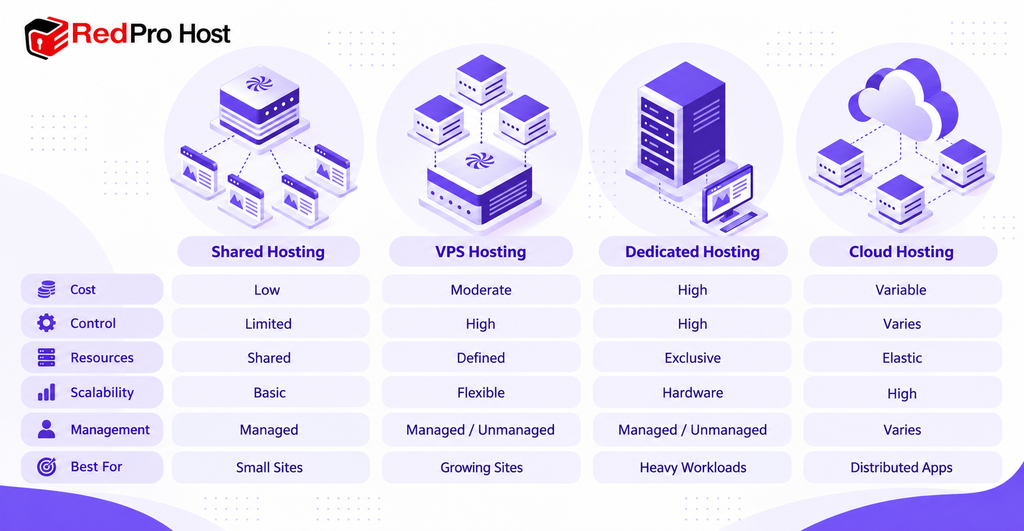
VPS hosting provides more server control than shared hosting without requiring exclusive physical hardware. Shared hosting, dedicated hosting, and cloud hosting serve different operating requirements. Their main differences involve cost, control, resource allocation, and scalability.
1. VPS vs. Shared Hosting
Shared hosting places multiple websites within a provider-managed hosting environment. Customers typically receive limited access to operating system configuration. VPS hosting offers a separate virtual environment and greater administrative freedom.
2. VPS vs. Dedicated Hosting
Dedicated hosting provides exclusive access to an entire physical server. VPS hosting instead allocates virtual server resources on shared physical hardware. Dedicated hosting can suit workloads requiring exclusive hardware capacity, but often involves higher costs.
3. VPS vs. Cloud Hosting
Cloud hosting uses cloud computing infrastructure to deliver virtual computing or managed application services. Some cloud hosting services provide distributed architecture and flexible resource scaling. However, cloud hosting and VPS hosting overlap because cloud platforms can also offer VPS instances.
Hosting Comparison Table
| Feature | Shared Hosting | VPS Hosting | Dedicated Hosting | Cloud Hosting |
| Typical cost | Low | Low to moderate | High | Variable |
| Server control | Limited | High | High | Varies |
| Computing resources | Shared hosting environment | Defined virtual allocation | Exclusive physical hardware | Depends on service |
| Scalability | Plan upgrades | Resource upgrades | Hardware upgrades | Often flexible |
| Technical management | Usually provider-managed | Managed or unmanaged | Managed or unmanaged | Depends on service |
| Best for | Small websites | Growing websites and custom applications | Demanding workloads | Variable or distributed workloads |
The best hosting option depends on what your project actually needs. Shared hosting may be sufficient for a basic WordPress blog. VPS hosting becomes useful when additional control, specific software, or greater resource flexibility is required.
What Are the Disadvantages of VPS Hosting?
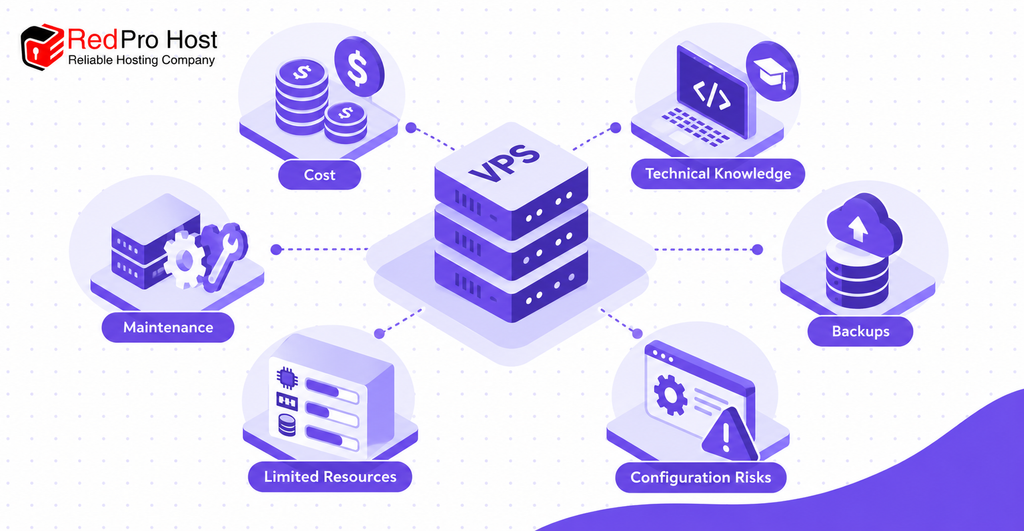
The main disadvantages of VPS hosting include higher costs, technical complexity, maintenance responsibilities, and limited computing resources. These drawbacks become particularly important with unmanaged VPS hosting. Understanding them helps you evaluate whether the additional control is worthwhile.
1. Higher Hosting Costs
VPS hosting generally costs more than basic shared hosting. For example, Amazon Lightsail lists a Linux VPS plan starting at $5 monthly. Additional services, such as external backups or server management, can increase the total cost.
2. Technical Knowledge Requirements
Unmanaged VPS hosting requires basic server administration knowledge. You may need to configure SSH access, install Nginx, and troubleshoot application errors. Incorrect commands can interrupt running services or change important configurations.
3. Security and Maintenance Responsibilities
Administrators must manage operating system updates, firewalls, and access permissions. For example, an outdated application or exposed management port may create security risks. Managed hosting reduces some responsibilities, but support coverage depends on the provider.
4. Backup and Recovery Requirements
Automatic backups are not included with every VPS plan. A damaged database or accidental file deletion can cause data loss. Maintain separate backups and test recovery procedures before relying on them.
5. Limited Server Resources
A VPS has resource limits based on its plan. For example, a server with 2 vCPUs and 4 GB RAM can become overloaded by demanding applications. Upgrading resources may help, but inefficient software can still cause problems.
6. Server Configuration Risks
Incorrect firewall rules, DNS records, or web server settings can interrupt access. For example, blocking the SSH port before configuring alternative access can lock out an administrator. Provider recovery consoles and documented configurations can reduce these risks.
How to Choose the Right VPS Hosting Plan
Choose a VPS hosting plan based on your workload, technical ability, required resources, and total operating cost. Start by identifying the software you need to run. Then compare management options and resource allocations before purchasing.
Choose Between Managed and Unmanaged VPS
Managed VPS hosting is suitable for beginners and businesses that need technical assistance. Providers typically handle specified maintenance tasks such as operating system updates and server monitoring. However, the exact service agreement determines which responsibilities remain with the customer.
Unmanaged VPS hosting gives experienced users greater responsibility for the operating environment. You generally install software, configure networking, and manage server security yourself. This option suits developers who need custom configurations and can maintain them.
For example, a beginner running a WordPress store may prefer managed VPS hosting. A developer deploying several Docker applications may choose an unmanaged Linux VPS. The better option depends on technical skills, support requirements, and budget.
Check Server Resources and Requirements
CPU and RAM: CPU provides processing capacity, while RAM supports running applications. A sample starting configuration could include 2 vCPUs and 4 GB RAM. Actual requirements depend on application activity, concurrent users, and database usage.
Storage and Bandwidth: SSD and NVMe storage can provide fast data access for compatible workloads. Check disk capacity and monthly transfer allowances before selecting a plan. Video delivery and large file downloads can consume more bandwidth than a basic blog.
Operating System: Linux distributions such as Ubuntu and Debian support common web software. Windows Server is useful when an application specifically requires the Windows environment. Windows licenses may also increase monthly hosting costs.
Server Location: Choose a data center geographically close to your main audience when practical. Shorter network distances can help reduce latency. However, website speed also depends on caching, network routing, and application performance.
Scalability and Backups: Check whether the provider supports CPU, RAM, and storage upgrades. Confirm whether automated backups, snapshots, and recovery tools are included. A snapshot is useful for recovery, but it should not replace independent backups.
For a concrete example, Amazon Lightsail’s documented plans include a Linux instance with 2 vCPUs, 4 GB RAM, and 80 GB storage. The published monthly price for its public-IPv4 configuration is $24. This is a pricing example, not a recommended specification for every VPS workload.
How Much Does VPS Hosting Cost?
Basic VPS hosting can start near $5 monthly, while larger or managed plans can cost substantially more. Pricing depends on CPU, RAM, storage, operating system, and management services. A provider’s advertised price may not include every expense.
For example, Amazon Lightsail lists Linux configurations at $5, $24, and $44 per month. These example plans provide different memory and storage allocations. Pricing can change, so check the provider’s current offer before purchasing.
Server management also affects cost. Managed hosting may include operating system updates, monitoring, and technical support. Unmanaged hosting may cost less but requires administrative time and skills.
Additional expenses can include backups, control panel licenses, extra storage, and bandwidth charges. For example, cPanel licensing or Windows Server hosting may increase the monthly bill. Some providers also charge separately for snapshots and recovery services.
Free VPS trials may help you test a server before committing. However, trials can include usage limits, promotional credits, or eligibility restrictions. Review billing conditions to avoid unexpected charges when the trial ends.
VPS hosting is worth considering when its flexibility solves a measurable hosting problem. An agency running 5 client websites might benefit from a properly sized VPS. A simple personal blog may not justify the additional expense or management work.
Frequently Asked Questions About VPS Hosting
Is VPS hosting safe and secure?
VPS hosting can be secure when the server is properly configured and maintained. Virtualization separates your operating environment from neighboring hosting accounts. However, security also depends on software updates, firewall rules, and access management.
Use SSH keys, strong authentication, and restricted network access when possible. Maintain independent backups and monitor unusual server activity. Managed VPS hosting may simplify some security tasks, depending on the provider.
Is VPS safer than VPN?
VPS and VPN serve different purposes, so neither is automatically safer than the other. A VPS provides a virtual computing environment for hosting software. A VPN creates an encrypted connection between devices and a VPN server.
You can install VPN software such as WireGuard on a VPS. This combines a hosted server with private network connectivity. However, both technologies require proper configuration to reduce security risks.
Can I host my own VPS?
Yes, you can create virtual private servers on hardware you own. Virtualization platforms such as Proxmox VE and KVM can run virtual machines on compatible computers. This gives you control over the underlying physical server.
However, hosting from home requires reliable electricity, internet connectivity, and network configuration. You must also maintain hardware and protect the system from unauthorized access. Renting a VPS avoids the need to operate physical server hardware yourself.
Is VPS hosting suitable for beginners?
Beginners can use VPS hosting, especially when choosing a managed service. Managed VPS providers may handle operating system maintenance, security updates, and basic server troubleshooting. This reduces the technical work required from website owners.
Unmanaged hosting requires knowledge of server administration and security. For example, users may need to connect through SSH and configure web server software. Beginners running simple websites may find shared hosting easier.
Can a VPS run 24/7?
A VPS can run continuously, making it suitable for services that need ongoing availability. Examples include websites, automated scripts, and game servers. The hosting provider supplies infrastructure designed for continuous operation.
However, power failures, network outages, maintenance, and software errors can interrupt service. Reliable applications require monitoring, backups, and recovery procedures. An uptime agreement does not eliminate the possibility of downtime.
How many websites can I host on one VPS?
A VPS can host multiple websites, but there is no fixed universal limit. The number depends on server resources, application complexity, and visitor activity. A basic website may consume fewer resources than a busy WooCommerce store.
For example, an appropriately configured VPS could host 5 small client websites. However, 5 resource-intensive applications might require substantially more computing capacity. Measure CPU, RAM, disk usage, and response times before adding more websites.
Conclusion
VPS hosting provides a flexible environment for running websites, applications, databases, game servers, and private online services. Its main advantages include server control, allocated resources, and software customization. These features make VPS hosting useful when basic shared hosting becomes restrictive.
However, VPS hosting also involves costs, resource limits, and maintenance responsibilities. A small website may work well on shared hosting, while a demanding application may need a VPS. Managed hosting can reduce technical work for users without server administration experience.
Before choosing VPS hosting, identify your workload and measure its resource requirements. Compare CPU, RAM, storage, support, and total costs across suitable plans. The right hosting option is the one that meets your actual needs without unnecessary expense or complexity.